Home
About
Services
Contact

Category 1

17
  • How to Customize the Documentation SideBar?
  • How to Change BreadCrumbs Settings in BetterDocs?
  • Quam corporis qui nobis aliquam.
  • Voluptatem sed ut iure eaque.
  • Id dolorem fugit voluptatem est.
  • Ab aliquid ut tempora labore.
  • Doloribus quam corporis architecto at.
  • Animi culpa non et est.
  • Et et sunt quasi maxime.
  • Omnis fugiat et ut non voluptatum quas.
  • Leo Messi
  • How to Install and Activate BetterDocs
  • How to Activate BetterDocs License Key?
  • How to Sort & Organize Documentation in BetterDocs?
  • What Is BetterDocs and What Does it Do?
  • Where Can I See the Roadmap for BetterDocs?
  • Sample Doc 1

Category 9

12
  • What is Sticky Table of Contents (TOC) & How to enable it in BetterDocs?
  • Ex recusandae omnis dicta veniam.
  • Why Isn’t BetterDocs Showing All the Articles?
  • Is BetterDocs Multi-site Compatible?
  • How to Sort Knowledge Base Categories in BetterDocs?
  • How to Migrate Docs to BetterDocs From an Existing Knowledge Base Plugin?
  • Can I Use BetterDocs with Elementor Page Builder?
  • Does BetterDocs Work with Shortcodes?
  • Can I Disable Feedback Emojis in BetterDocs?
  • Can I Use BetterDocs on Non-WordPress websites?
  • Ut perferendis sint aliquam nisi.
  • How To Configure BetterDocs Table Of Contents In Elementor

Category 2

11
  • At vitae et dolorem qui iure.
  • How to Manage Categories & Tags in BetterDocs?
  • What’s the Difference Between the Free and PRO Version of BetterDocs?
  • How to Use Advanced Drag & Drop Builder to Organize Content in BetterDocs?
  • How to Configure Doc Single Page with BetterDocs
  • Sticky Table of Content Isn’t Working in BetterDocs. What’s Wrong?
  • Does BetterDocs Work with Oxygen Page Builder?
  • Eos dolorem in totam sit.
  • Adipisci fuga accusantium non.
  • Non cupiditate illo facilis aut illum.
  • AI Generated Docs

Category 4

7
  • How to Use Shortcodes to Display Docs in BetterDocs?
  • How to Resolve the “Download failed. Unauthorized” Error When Updating BetterDocs PRO?
  • How To Customize the Documentation Live Search?
  • How to Manage User Roles in BetterDocs?
  • Why Isn’t Table of Content Working in BetterDocs?
  • Et dolores iure ullam natus soluta.
  • Aut et eum ipsum nihil enim.

Category 3

5
  • What are the Requirements to Use BetterDocs?
  • Do I Need Any Additional Plugin to Use BetterDocs?
  • How to Change Slug For Doc Page in BetterDocs?
  • Is BetterDocs SEO Friendly for Your WordPress Website?
  • Ut et mollitia non magni.

Category 8

11
  • Rem suscipit dolorum quisquam ut.
  • Does BetterDocs Work with Any Theme or Page Builder?
  • How to Migrate From Existing Documentation Plugins to BetterDocs?
  • Enim dolore quaerat quia.
  • In optio itaque accusantium qui omnis.
  • How To Configure Docs Page With Elementor?
  • How To Configure Docs Category Archive Page With Elementor?
  • Et nesciunt ipsa dolor.
  • How To Manage Knowledge Base With BetterDocs Grid View?
  • Sint corporis non rerum fugit.
  • Et unde voluptatibus id totam.

ক্যাটাগরি 1

2
  • Neque eum excepturi et odio cupiditate.
  • Leo Messi

Category 5

7
  • How To Configure Documentation Homepage with BetterDocs
  • How To Configure Documentation Homepage & Single Page in BetterDocs
  • How to Manage Multiple Knowledge Base with BetterDocs
  • How to Configure & Style BetterDocs Category Grid In Elementor?
  • How To Manage Documentation With BetterDocs Advanced List View
  • In velit molestias enim id laboriosam.
  • Est dolorem sint sit omnis est.

Category 6

8
  • How to Customize the Documentation Archive Pages?
  • How to Remove Branding of BetterDocs?
  • Quo consequatur aliquam ut aut.
  • How To Configure Single Doc In Elementor
  • How To Configure & Style BetterDocs Category Box In Elementor?
  • How To Manage Internal Knowledge Base With BetterDocs
  • Est delectus ut fuga sed ullam.
  • Sint molestiae optio et velit.

Category 7

6
  • How To Switch Back to Classic / Modern UI in BetterDocs?
  • How to Avoid Sticky Table of Content From Overlapping in BetterDocs?
  • How To Use BetterDocs Ready Blocks In Elementor
  • How To Translate Single Docs Of BetterDocs Using WPML
  • How to Create Multiple Knowledge Bases with Elementor & BetterDocs
  • Autem quasi cum id qui sit consectetur.

Category 1 Sub

2
  • Category 1 Docs Sub
  • Leo Messi
View Categories
  • Home
  • Docs
  • How To Configure Feedback Section With BetterDocs For Shopify?

How To Configure Feedback Section With BetterDocs For Shopify?

1 min read

With BetterDocs For Shopify, you can get user reviews easily without any coding. You can enable this option simply from the BetterDocs homepage. Follow the instructions to discover how to get feedback with BetterDocs. 

How To Configure Feedback Section With BetterDocs? #

Follow the step-by-step guide below to learn how to configure the feedback section for your knowledge base with just a few steps. 

Note: You must have BetterDocs for Shopify installed on your store.

Step 1: Enable Feedback From The Homepage #

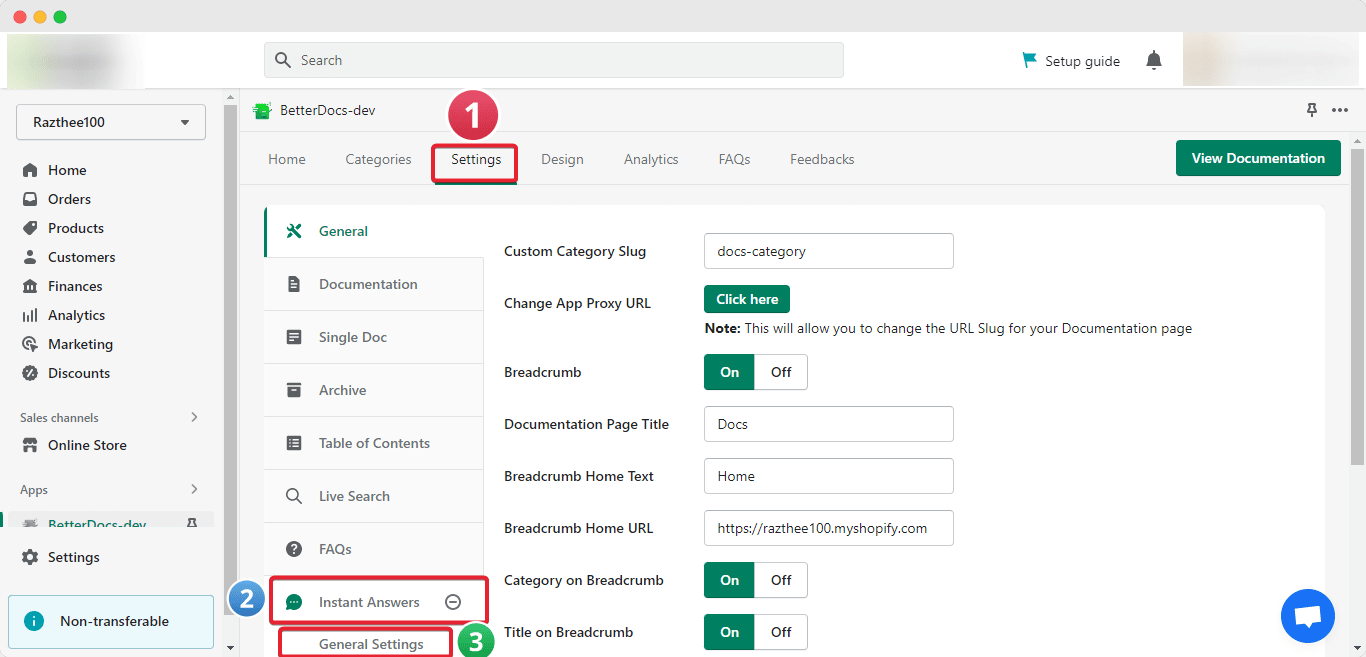
First, navigate to Settings→ Instant Answers→ General Settings from the Shopify homepage. 
Feedback Section

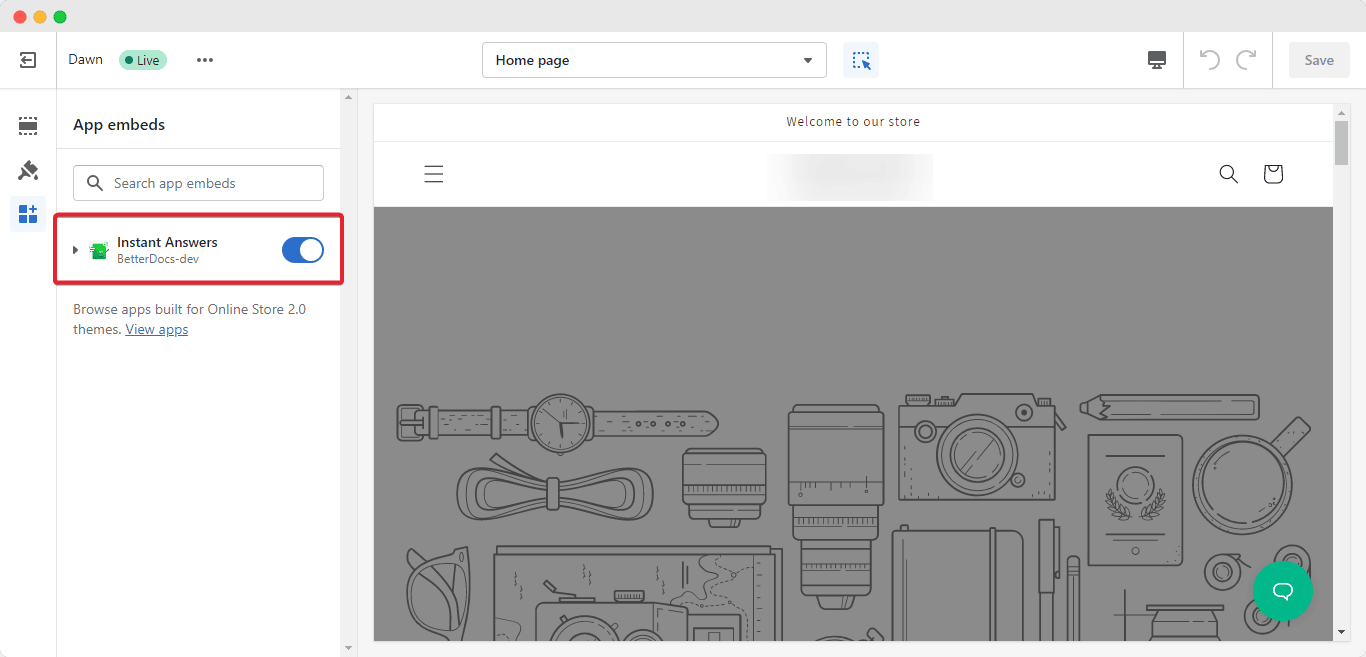
Click on the ‘Enable/Disable’ option to activate instant answers from BetterDocs For Shopify. You will be redirected to your store page. Here, simply toggle on the ‘Instant Answer’ option to enable the feature. 
Feedback Section

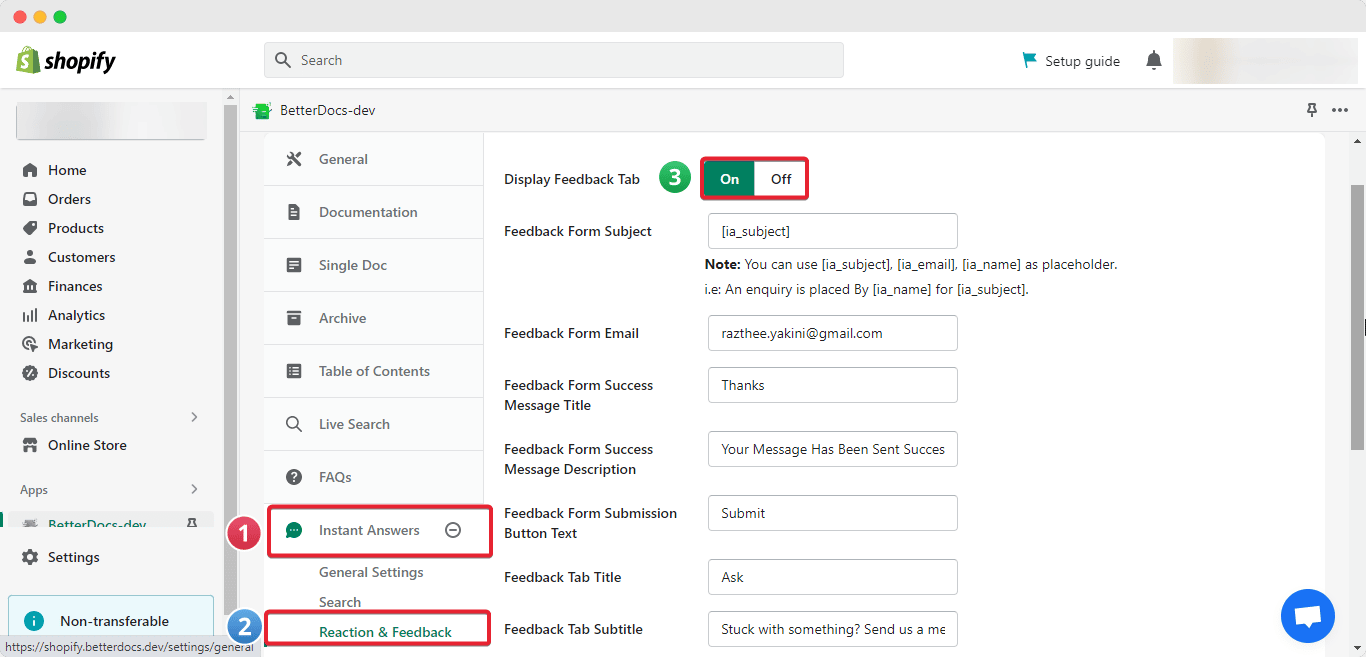
Now go back to the ‘Settings’ page and navigate Instant Answer→ Reaction & Feedback. Toggle on the ‘Display Feedback Tab’ and press ‘Save Changes’. 
Feedback Section

Step 2: Fully Customize Your Feedback Section #

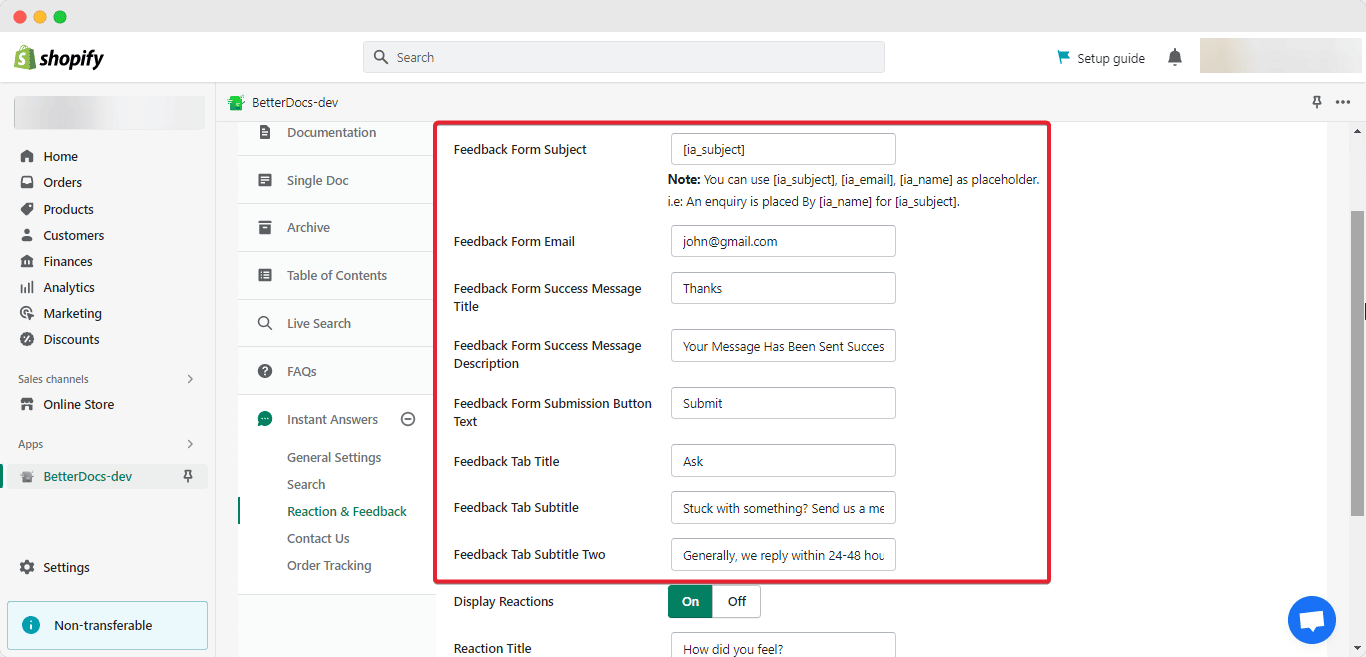
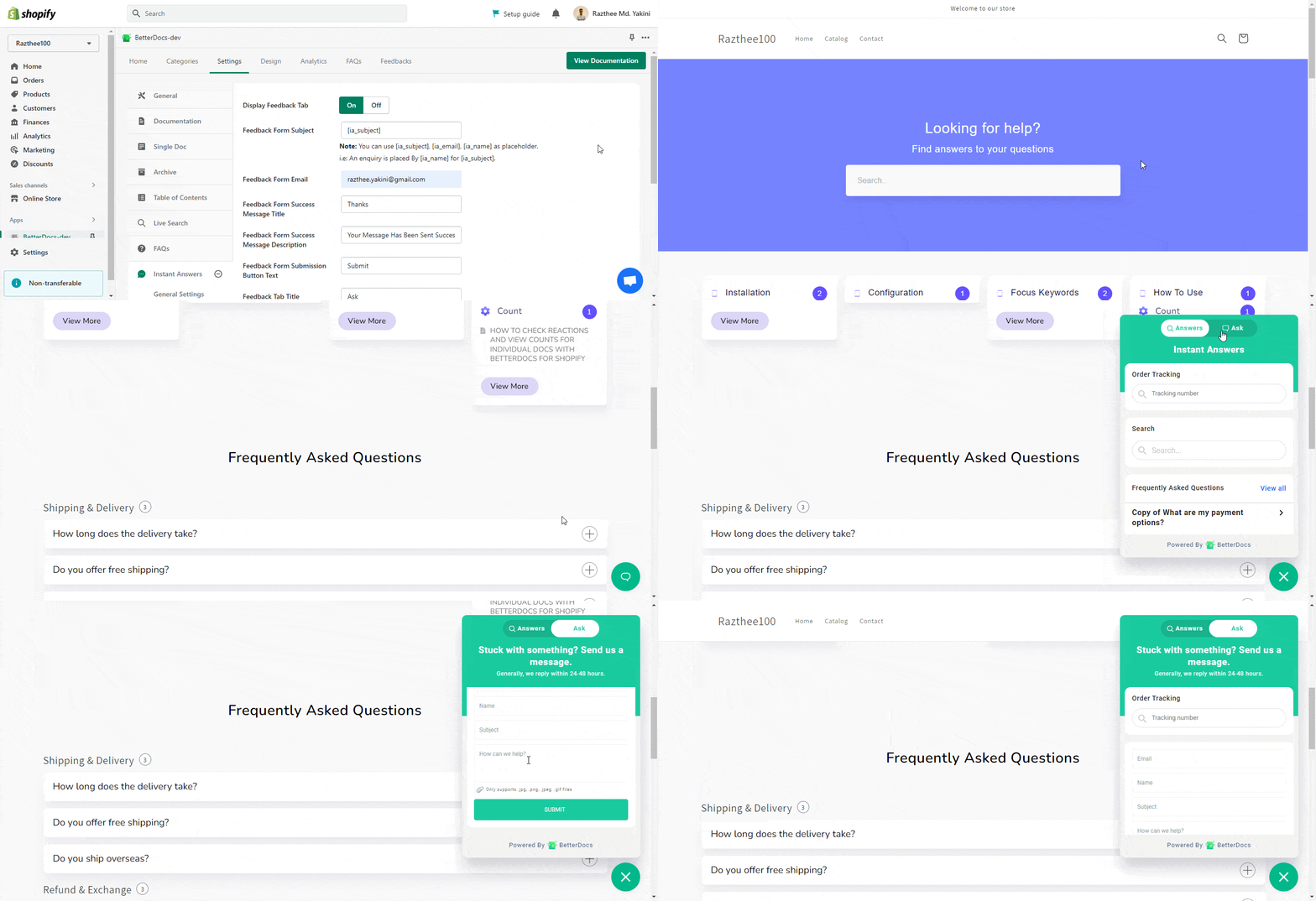
You can customize your Feedback form any way you like. Easily set your preferred Subject, Success Message Description, Success Message Title, Submission Button Text, and much more. 
Feedback Section

You can easily see the parameters you have set on your feedback form. Simply click on the ‘Chat’ button and switch to the ‘Ask’ tab. Here you can see your added fields. 
Feedback Section

Step 3: View Customer Feedback In BetterDocs #

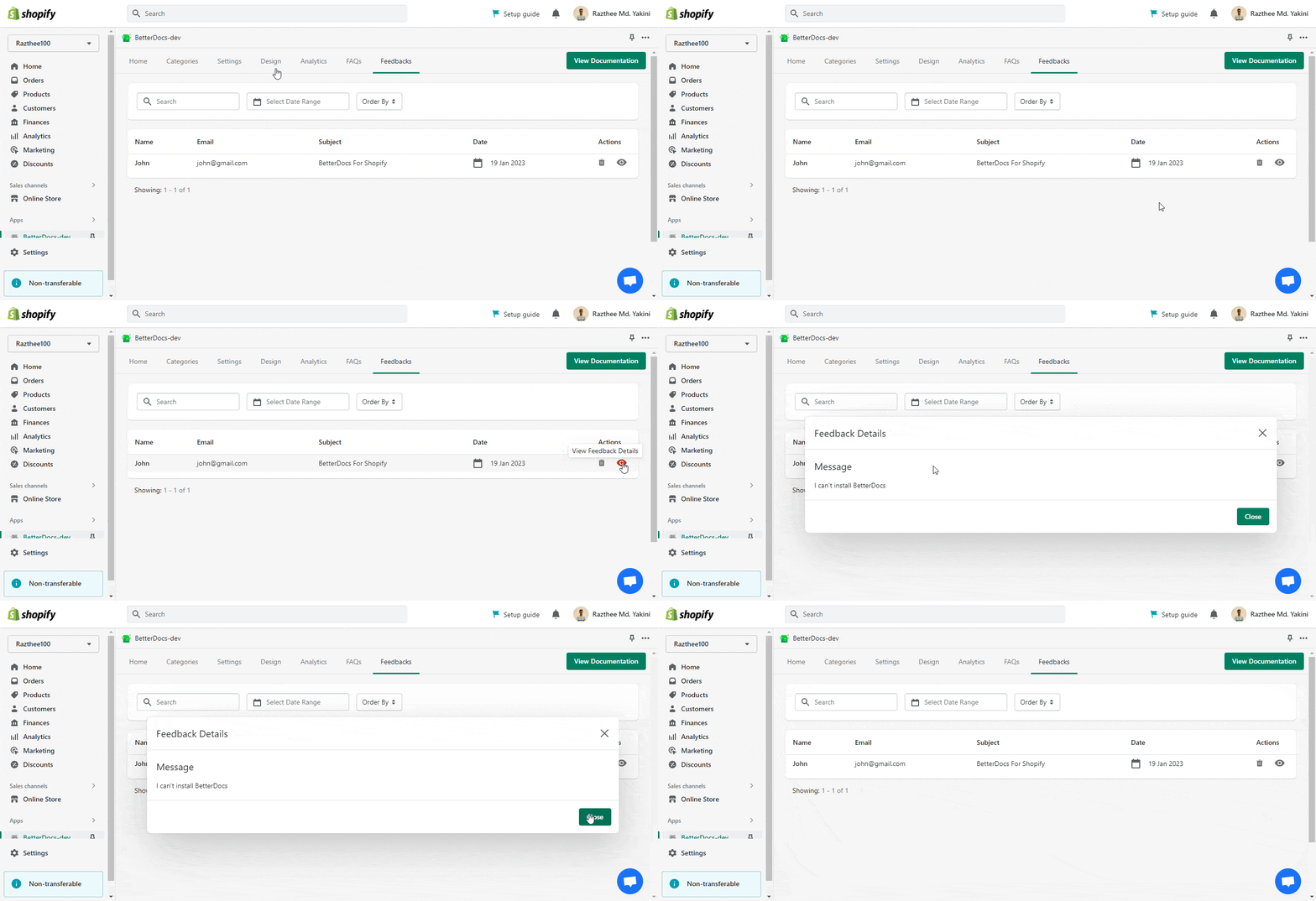
To see your customer feedback, go to the ‘Feedbacks’ tab. Click on the message to evaluate your customer feedback. 
Feedback Section

This is how you can easily configure the BetterDocs feedback section with BetterDocs For Shopify app. 

For any difficulties, feel free to contact our dedicated support team.

Updated on January 24, 2023

What are your Feelings

  • Happy
  • Normal
  • Sad

Share This Article :

  • Facebook
  • X
  • LinkedIn
  • Pinterest

Powered by BetterDocs

Table of Contents
  • How To Configure Feedback Section With BetterDocs?
    • Step 1: Enable Feedback From The Homepage
    • Step 2: Fully Customize Your Feedback Section
    • Step 3: View Customer Feedback In BetterDocs

Subscribe To Our Newsletter

Subscription Form
  • Contact

  • Services

  • FAQ

  • Privacy & Policy